
Android app
The CrackerStall app for Android.
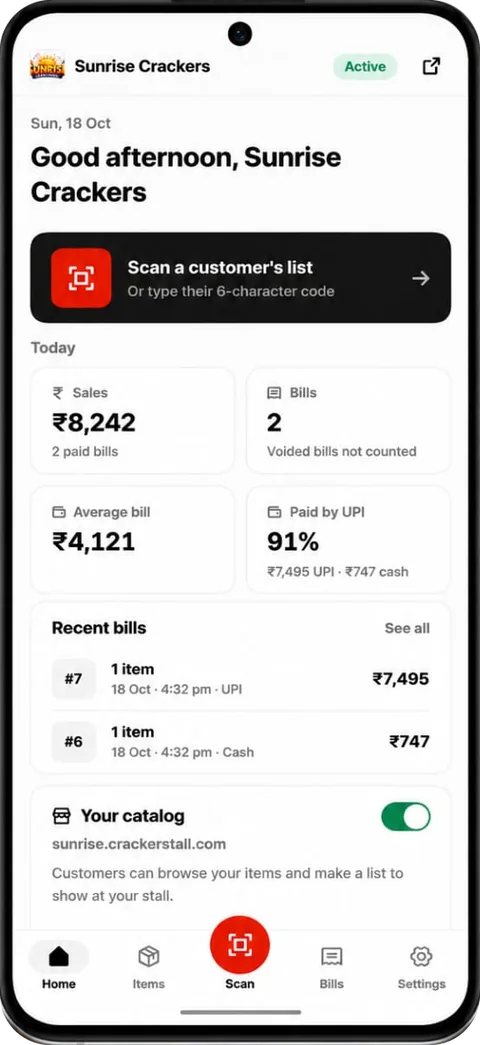
CrackerStall for Vendors is on Google Play. Scan lists, bill and keep your catalog up to date with the same account as the website. Your customers still need nothing: they scan your QR and use their phone's browser.
- Opens straight to your stall, full screen
- Long-press its icon for Scan and bill, New bill or Bills
- The same sign-in, items and bills as the website
 (opens in a new tab)
Free to download, for Android 7.0 and newer.
On an iPhone or a computer, use CrackerStall in the browser.
Start in three steps.
- 1
Install the app
Get CrackerStall for Vendors from Google Play on your Android phone. It is free to download.
- 2
Sign in
Use the same email and password, or Google, as on the website. A new stall can create its account in the app.
- 3
Bill at the counter
Scan a customer's list or type its six-character code, check today's prices and create the bill.
Questions about the app.
Can't find your answer? Write to support@crackerstall.com.
Yes, it is free to download. Using it needs a CrackerStall account with an active plan or free trial. Plans are bought on crackerstall.com.